

Beat Maker Pro - DJ Drum Pad
MWM - AI Music and Creative Apps
I approached Beat Maker Pro - DJ Drum Pad as a quick music-making tool rather than a replacement for a full digital audio workstation, and that distinction explains most of my experience with it. The app puts the focus on tapping drum pads while a song plays, so the appeal is immediate: you can experiment with rhythm without first learning a complicated studio interface. I found it most enjoyable when I wanted to turn a spare few minutes into a small beat idea, practise timing, or add a little energy to music I was already listening to.
My overall view is positive, but specific. This is a friendly entry point into beat making, especially for people who want hands-on interaction instead of a screen full of tracks and technical controls. It is less convincing for anyone expecting detailed production, deep arrangement tools, or the control of a desktop-style workstation. The strongest reason to try it is the low barrier between opening the app and making a rhythm. The main reason to hesitate is that this simplicity also limits how far a serious project can develop.
What using the drum-pad approach feels like
The central idea is easy to understand. You play a song and work the drum pads along with it, creating a direct connection between what you hear and what your fingers do. I liked that this makes rhythm feel physical. Instead of drawing notes on a timeline, I could react to the beat in the moment, test a pattern, and immediately decide whether my timing felt right.
That immediacy matters for beginners. Many music apps introduce a lot of terminology before they let you do anything useful. Here, the basic activity is much clearer: listen, tap, adjust your sense of timing, and try again. It feels closer to practising with a small electronic instrument than operating a traditional recording program.
The app belongs in the Music & Audio category, and it is developed by MWM - AI Music and Creative Apps. It is free to install, with optional in-app purchases ranging from $0.99 to $89.99 per item. That price range makes it worth checking what is included before treating it as a completely unrestricted studio tool. I would begin with the free experience and only consider spending money after deciding whether the pad-based workflow genuinely suits me.
Latest News

Uber Eats Under Pressure: What Happens When Delivery Goes Wrong

How QR & Barcode Scanner Adapts to Android and iOS Innovations

Why Waze Navigation & Live Traffic Is Your Essential Travel Companion

CapCut Mastery: Unleash Hidden Features for Pro-Level Editing

How OS Updates Enhance Roblox Adventures

Teacher Simulator: Exam Time Turns Quick Classroom Judgments into a Repetitive Loop
The app has been available since August 20, 2018, and its current version is 4.13.00. It runs on Android 7.0 or later, which gives it a fairly broad reach for people using older compatible devices. Its Everyone content rating also fits the straightforward, accessible character of the experience. Nothing about the basic concept feels aimed only at trained musicians.
Why the simple interaction works
The best part is the feedback loop between listening and tapping. When I tried to follow a track, I was not merely pressing buttons at random; I was paying attention to the kick, snare, and spaces between hits. That makes the app useful as a casual introduction to beat structure. A person who has never opened a music-production program can start noticing how repeated patterns create movement.
I also found the format useful for short practice sessions. If I had only a few minutes, I could concentrate on one rhythm rather than spending that time setting up a project. This is a meaningful advantage over a full workstation, where the number of choices can become a distraction. Beat Maker Pro keeps the first step obvious.
Gallery
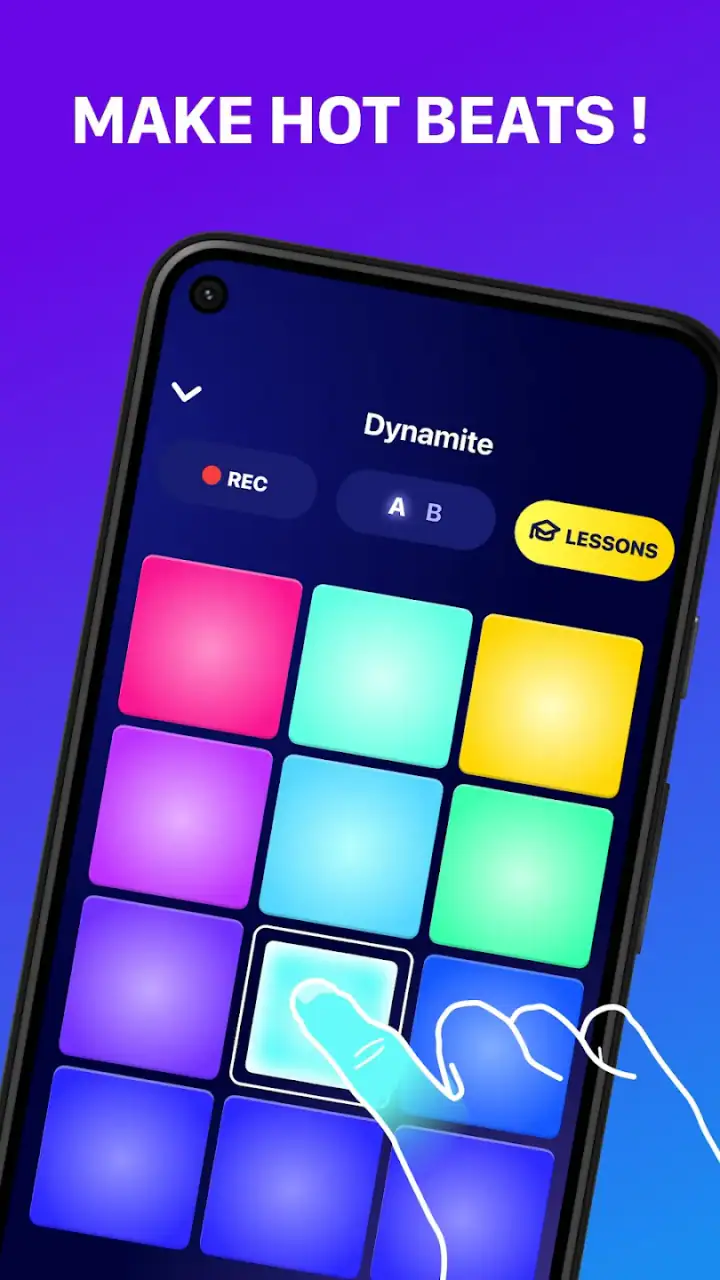
There is also a social side to the experience. It is easy to imagine handing the phone to a friend and taking turns trying to stay with the same song. That kind of casual sharing is harder to achieve with an app built around menus, tracks, and editing panels. The drum-pad format invites participation even from someone who would never describe themselves as a musician.
One practical tip improved my sessions: I got better results when I listened through the song once before tapping seriously. That let me identify the main pulse and anticipate changes instead of reacting late to every sound. Beginners may be tempted to hit every pad constantly, but leaving space often produces a more convincing rhythm and makes timing problems easier to hear.
Useful beyond casual tapping
Although I would not call it a complete production environment, the app can support several small, realistic routines. A beginner can use it to learn the difference between a steady pulse and a decoration around that pulse. Someone who writes songs can use it to test whether a chorus needs a busier drum feel before opening a more advanced tool. A DJ hobbyist can use it as a low-pressure way to practise hearing subdivisions while a track continues underneath.
For me, the most interesting use was idea testing. If I had a rough sense that a song needed a stronger entrance, I could try a more active pattern and immediately hear whether the energy improved. This is not the same as producing a finished arrangement, but it is a useful creative checkpoint. It helps answer “does this rhythm feel right?” before I invest time in detailed editing.
Another non-obvious benefit is that the app encourages listening discipline. Because the music continues while I interact with the pads, I had to distinguish the beat I wanted to follow from the sounds already present in the track. That is a small but valuable exercise for anyone learning to hear rhythm in a busy mix. It is less about collecting perfect loops and more about developing a sense of placement.
A realistic everyday session
Imagine having a short break after work and wanting something more active than passive scrolling. I would open the app, choose a song, listen for its main pulse, and spend a few minutes trying a restrained pattern. On a first pass, I might tap only the obvious beats. On a second pass, I could add occasional hits around the transitions. The point would not be to create a polished release; it would be to explore how the groove changes when I become more or less busy.
That scenario shows where the app fits well. It offers a creative activity with almost no preparation, and the result depends on my attention rather than on a long setup process. It can also work during a casual gathering, where people can compare approaches to the same music. I would not use it for a quiet background activity, though, because the value comes from actively listening and responding.
Where the experience falls short
The same simplicity that makes the first session approachable becomes the main limitation after the novelty fades. If I wanted detailed control over a multi-part composition, a conventional mobile workstation would usually be the better choice. Those alternatives tend to offer more room for arranging sections, editing individual events, balancing layers, and building a project over time. Beat Maker Pro is more focused on performance and immediate rhythm play.
That difference is important for expectations. I would not choose this app as my primary tool for recording a complete song, managing a complex arrangement, or refining a mix for release. Its strength is the live-feeling pad interaction, not the breadth of a studio. Someone who already works comfortably with a sequencer may find the experience too narrow unless they specifically want a quick rhythm exercise.
The phone screen can also create friction. Drum-pad play depends on accurate finger placement and a comfortable response from the device. On a smaller screen, fast patterns may feel cramped, while on a slower or less responsive phone, the connection between a tap and the resulting sound can feel less satisfying. I would test the app on the device I plan to use rather than assuming the experience will feel identical everywhere.
Another trade-off is concentration. Playing along with a song sounds simple, but keeping time while choosing pads can be harder than expected. New users may interpret missed hits as a problem with the app when the real issue is that they are trying to follow too many elements at once. I recommend starting with one repeating pattern and adding variation only after the basic pulse feels stable.
The optional purchase model deserves a practical warning. Since individual in-app purchases can reach $89.99, I would avoid tapping through purchase screens casually and would check the exact offer before confirming anything. The free starting point is useful for judging the concept, but anyone seeking a large library or broader access should consider the long-term cost rather than focusing only on the word “free.”
I also think the app’s value depends heavily on the user’s goal. If the goal is instant interaction, it makes sense. If the goal is precise editing, it may feel restrictive. If the goal is learning formal music theory, it can provide useful rhythm practice but should not be mistaken for a complete course. That is not a failure; it is simply the boundary of a focused tool.
How it compares with familiar alternatives
Compared with a full mobile digital audio workstation, this app is quicker to enter and easier to understand, but much less flexible once an idea becomes complicated. A workstation is better when I want to build a song in layers and revisit exact details later. Beat Maker Pro is better when I want to respond to a track immediately and keep the creative process physical.
Compared with a basic metronome, it is more engaging because the music provides context and the pads invite variation. A metronome remains the cleaner choice for strict tempo practice, especially when I want an uncluttered pulse without a song competing for attention. I see this app as a bridge between simple rhythm practice and playful performance, not as a replacement for either a metronome or a studio.
Compared with loop-based beat apps, the drum-pad approach feels more reactive. Loop tools are often convenient when I want repeatable building blocks, while this app puts more emphasis on what I do in real time. That can feel more expressive, but it may also be less predictable. If I need the same pattern to repeat exactly across a structured composition, another category of app will probably serve me better.
Who will get the most from it
I would recommend it to curious beginners, casual music fans, aspiring DJs, and anyone who wants a low-pressure way to explore rhythm. It is particularly suitable for people who are intimidated by complex production software but still want to make something with their hands. The accessible age rating and broad device compatibility also make it a reasonable option for experimenting on a family Android device, provided purchases are handled carefully.
It can also suit a musician who already has advanced tools but wants a separate app for quick sketches. I would use it to test a groove, wake up my sense of timing, or explore a rhythmic direction before moving the idea into a more capable environment. In that role, its narrow focus becomes an advantage because it prevents me from overthinking the first experiment.
I would advise experienced producers to skip it if they expect professional-level control from one app. It is also not my first recommendation for someone who wants to compose melodies, edit vocals, arrange a full track, or learn through a structured curriculum. A piano-roll editor, multitrack workstation, or dedicated lesson app would be more appropriate for those needs.
What to check before committing
Before spending money, I would use the free version long enough to answer three practical questions. Do the pads feel comfortable on my phone? Do I enjoy playing along with songs rather than building patterns separately? Does the available level of control match what I actually want to make? If the answer to all three is yes, the app has a good chance of becoming a useful creative habit.
I would also decide whether I am looking for entertainment or a serious workflow. As entertainment, it is easy to understand and rewarding in short bursts. As a learning aid, it can sharpen basic rhythmic awareness when used deliberately. As a production platform, it is better viewed as a sketchpad than a finished studio. Keeping that distinction clear prevents disappointment.
The app’s popularity suggests that the concept has broad appeal: it has passed 50 million installs, with an average rating of 4.6 from around 502 thousand ratings and roughly 8.4 thousand written reviews. Those figures do not change my personal limitations assessment, but they do match my impression that the basic idea is easy for many people to pick up. The experience is approachable without being completely empty of musical value.
In the end, I see Beat Maker Pro - DJ Drum Pad as a focused rhythm playground with a useful educational edge. It succeeds because it removes the intimidating parts of music production and lets me begin with listening and touch. It falls short when I ask it to become a full arrangement and editing environment. My recommendation is simple: try it if you want immediate, hands-on beat practice; choose a fuller workstation if your destination is a finished song.
FAQs for Beat Maker Pro - DJ Drum Pad
What features does Beat Maker Pro - DJ Drum Pad offer?
Beat Maker Pro - DJ Drum Pad provides a range of features for both beginners and advanced users. It includes a variety of sound packs, customizable drum pads, a sequencer, and loop creation tools. Users can also access tutorials and lessons to improve their skills. The app supports recording and sharing your creations, making it versatile for music production.
Is Beat Maker Pro - DJ Drum Pad suitable for beginners?
Yes, Beat Maker Pro - DJ Drum Pad is designed to be user-friendly for beginners. It offers a selection of tutorials and lessons, which help new users understand the basics of beat-making and rhythm creation. The interface is intuitive, allowing users to explore and experiment without feeling overwhelmed.
Can I use Beat Maker Pro - DJ Drum Pad offline?
While Beat Maker Pro - DJ Drum Pad offers offline functionality, certain features such as downloading new sound packs or accessing online tutorials require an internet connection. Once sound packs are downloaded, users can create and edit their music offline, making it convenient for on-the-go music production.
How does Beat Maker Pro - DJ Drum Pad handle user privacy and data?
Beat Maker Pro - DJ Drum Pad prioritizes user privacy and data protection. The app requires minimal permissions, primarily for saving your music projects. It adheres to strict privacy policies and does not collect unnecessary personal data. Users are encouraged to review the privacy policy for detailed information on data handling practices.
Are there in-app purchases in Beat Maker Pro - DJ Drum Pad?
Yes, Beat Maker Pro - DJ Drum Pad includes in-app purchases. While the app is free to download, users can purchase additional sound packs, advanced features, and premium content. These purchases enhance the app’s functionality and provide a richer music-making experience. Users can enjoy the basic features without any cost.
Pros
- User-friendly interface for easy navigation.
- High-quality sound samples for professional results.
- Customizable pads to suit your style.
- Regular updates with new features.
- Offline mode available for on-the-go creativity.
Cons
- Limited free content; in-app purchases needed.
- Ads can be intrusive during use.
- Requires significant storage space.
- Some advanced features need a subscription.
- Minor bugs reported in recent updates.


